

Developing an Extra, Part II


Последнее обновление Oct 20th, 2026 | История страницы | Улучшить эту страницу | Сообщить о проблеме
Support the team building MODX with a monthly donation.
The budget raised through OpenCollective is transparent, including payouts, and any contributor can apply to be paid for their work on MODX.
Backers


Budget
$194 per month—let's make that $500!
Learn moreThis tutorial is part of a Series:
- Part I: Getting Started and Creating the Doodles Snippet
- Part II: Creating our Custom Manager Page
- Part III: Packaging Our Extra
В этой части мы создадим Custom Manager Page (CMP) для Extra Doodles из части 1: controller, connector и его processors, пункт Namespace и меню, а также сетку на ExtJS.
First Setup Steps
Part 1 left a working Snippet and a directory structure. Сниппет и базовая структура каталогов уже готовы. Для страницы менеджера нужно ещё три вещи: запись Namespace, пункт меню и topic Lexicon.
Namespaces
A Namespace tells MODX where the files of an Extra live, so an Extra can run without touching the MODX core. Part 1 already created the doodles Namespace — check it under Admin → Namespaces:
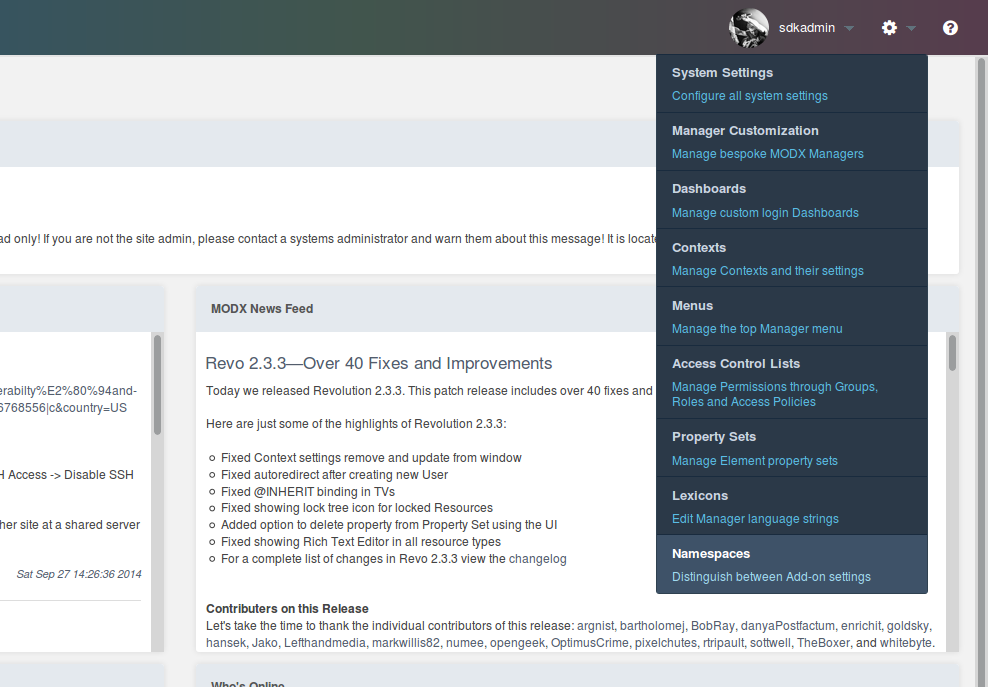
| Field | Value |
|---|---|
| Name | doodles |
| Core Path | Full absolute path to core/components/doodles/, or {core_path}components/doodles/ when the files are inside the MODX root. |
| Assets Path | Full absolute path to assets/components/doodles/, or {assets_path}components/doodles/. |
{base_path} works in both path fields and resolves to the root of the installation. Part 1 used it to point at the development copy.
Core Path MODX читает для controllers, файлов Lexicon и bootstrap.php. Assets Path — в ваше распоряжение: MODX сам его не читает, поэтому controller передаёт URL ассетов на страницу как часть собственной конфигурации.
Menus
A CMP is opened by a menu item, and the menu item is the route: the Namespace plus the name of the controller file. There is no separate Action object to create.
The controller controllers/index.class.php resolves to the action index, so the URL of the CMP is http://your-web-root/manager/?a=index&namespace=doodles. A Namespace and an empty action fall back to index as well (core/src/Revolution/modManagerResponse.php:67-70).
Create the menu item under Admin → Menus. Click Create above the menu tree:
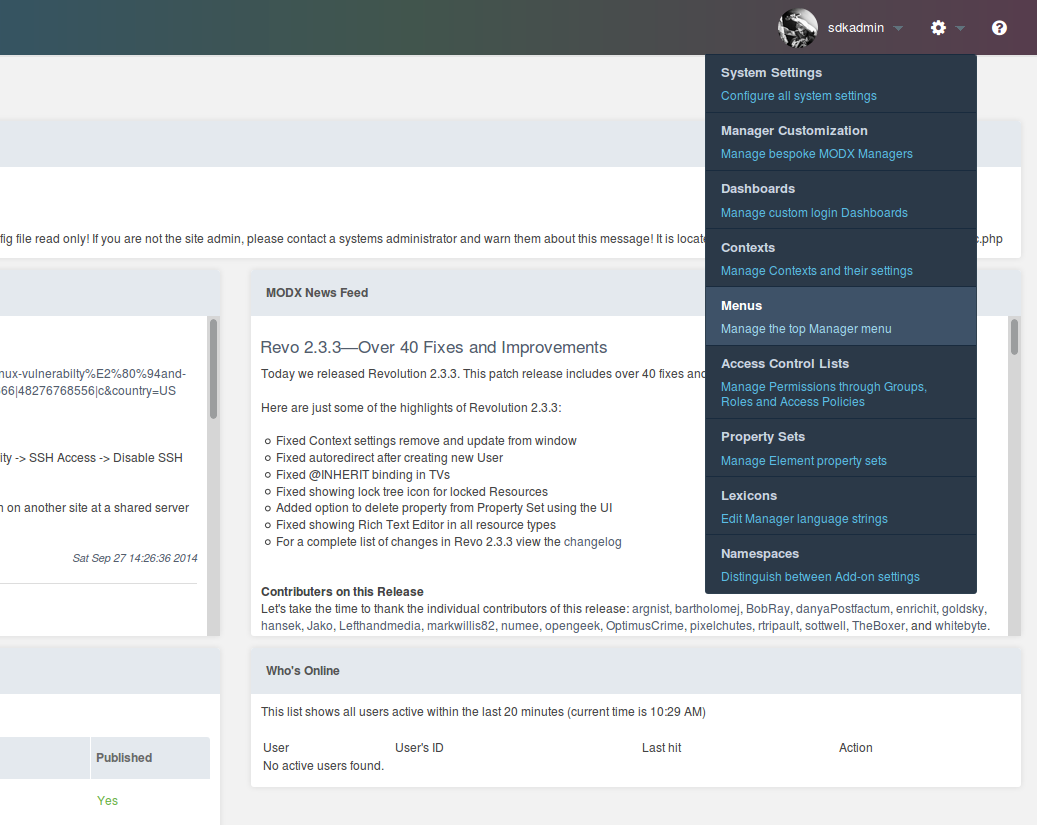
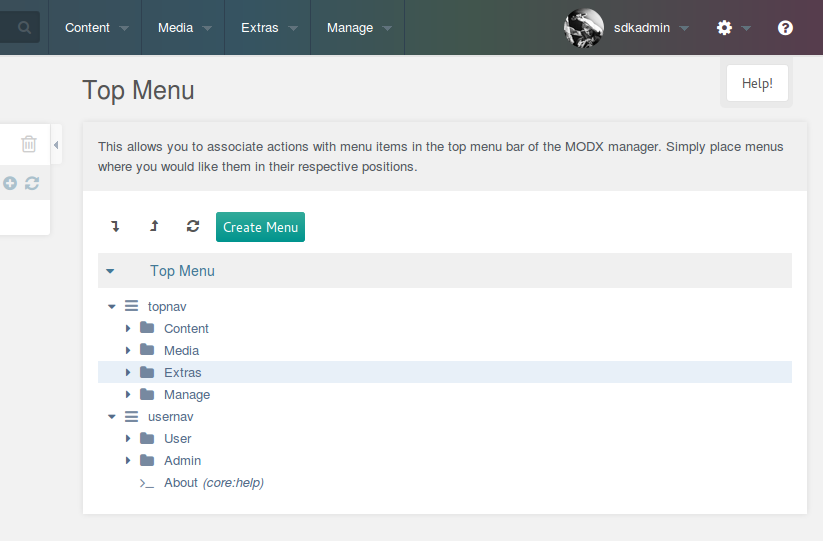
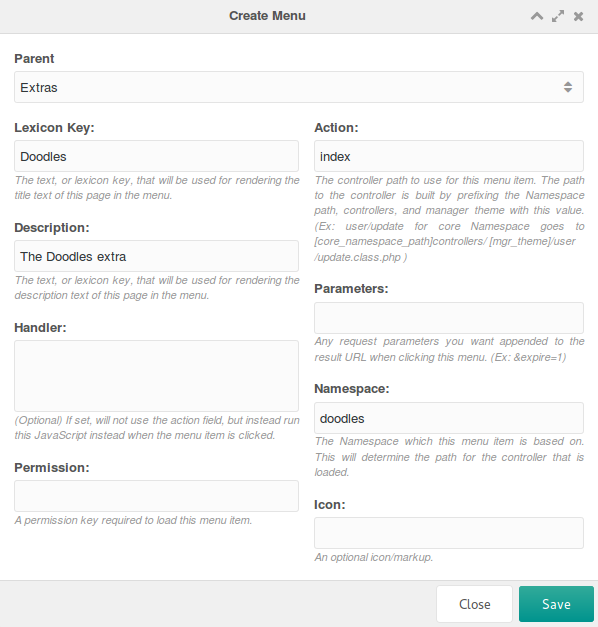
Fill the Create Menu window in like this:
| Field | Value | What it does |
|---|---|---|
| Parent | Extras | Where in the menu tree the item is listed. |
| Lexicon Key | Doodles | Key translated into the item caption. Use a plain name now and a Lexicon key later. |
| Description | The Doodles Extra | Free text or a Lexicon key. |
| Handler | — | Runs JavaScript instead of loading a page. Useful for items like “Clear Cache”; unused here. |
| Permissions | — | See below. |
| Action | index | The controller file MODX loads on click. |
| Parameters | — | GET parameters appended to the URL. Unused here. |
| Namespace | doodles | The Namespace of the controller. |
| Icon | — | Written into the menu as raw HTML, so a tag such as <i class="icon icon-home"></i>, not a file name. |
Parent: родительский пункт меню, под которым Extra появится в дереве. Обычно это «Extras».
Lexicon Key: ключ lexicon для пункта меню. Пока зададим имя напрямую, позже можно заменить на ключ Lexicon.
Description: свободный текст или ключ lexicon для перевода.
Handler: запуск JavaScript вместо загрузки страницы при клике по пункту меню. Полезно для действий без страницы, например «Clear Cache» в меню Site. Здесь не используется.
Пустой список Permissions — это не «без проверки»: тот же список проверяется при каждом клике по маршруту, и пустой список пропускает любого пользователя, который может попасть в менеджер. Заполните его, если CMP должна быть ограничена.
Action: имя controller-файла, который MODX загружает по клику. Укажите index.
Parameters: GET-параметры, которые добавятся к URL пункта меню. Нам не нужны, пропускаем.
Namespace: namespace doodles, который мы настроили ранее.
Icon: пишется в меню как сырой HTML, поэтому это тег вида <i class="icon icon-home"></i>, а не имя файла.
Save, and the item appears in the tree under Extras.
Lexicons
Lexicons hold the translations of an Extra. Strings, also called entries, are grouped into topics, and an Extra is free to load only the topics a page needs instead of all of them.
Keys are conventionally prefixed with the Namespace and a dot — doodles.desc — so that two Extras cannot collide.
Files live at:
{namespace_path}/lexicon/{language}/{topic}.inc.php
Create /www/doodles/core/components/doodles/lexicon/en/default.inc.php:
<?php
$_lang['doodle'] = 'Doodle';
$_lang['doodles'] = 'Doodles';
$_lang['doodles.desc'] = 'Manage your doodles here.';
$_lang['doodles.description'] = 'Description';
$_lang['doodles.doodle_err_ae'] = 'A doodle with that name already exists.';
$_lang['doodles.doodle_err_nf'] = 'Doodle not found.';
$_lang['doodles.doodle_err_ns'] = 'Doodle not specified.';
$_lang['doodles.doodle_err_ns_name'] = 'Please specify a name for the doodle.';
$_lang['doodles.doodle_err_remove'] = 'An error occurred while trying to remove the doodle.';
$_lang['doodles.doodle_err_save'] = 'An error occurred while trying to save the doodle.';
$_lang['doodles.doodle_create'] = 'Create New Doodle';
$_lang['doodles.doodle_remove'] = 'Remove Doodle';
$_lang['doodles.doodle_remove_confirm'] = 'Are you sure you want to remove this doodle?';
$_lang['doodles.doodle_update'] = 'Update Doodle';
$_lang['doodles.downloads'] = 'Downloads';
$_lang['doodles.location'] = 'Location';
$_lang['doodles.management'] = 'Doodles Management';
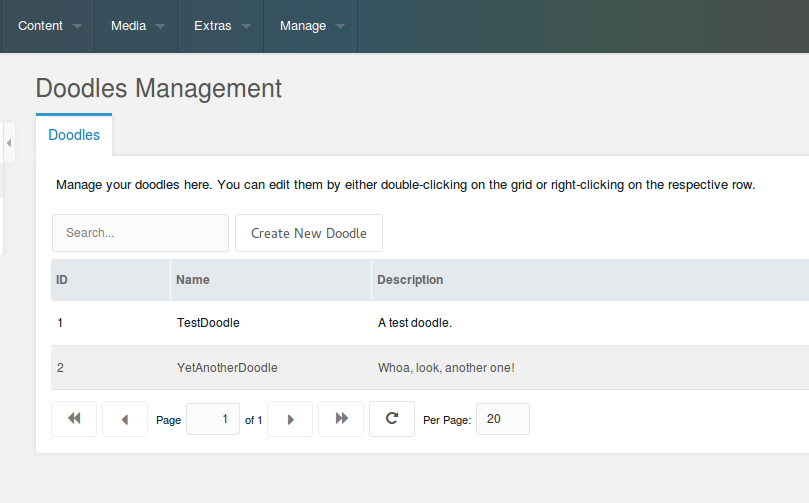
$_lang['doodles.management_desc'] = 'Manage your doodles here. You can edit them by either double-clicking on the grid or right-clicking on the respective row.';
$_lang['doodles.name'] = 'Name';
$_lang['doodles.search...'] = 'Search...';
$_lang['doodles.top_downloaded'] = 'Top Downloaded Doodles';
Файл Lexicon Topic — это просто массив $_lang. Здесь же строки doodles и doodles.desc, на которые ссылается пункт меню.
A Snippet loads a topic with $modx->lexicon->load('doodles:default'). A CMP loads it from the controller instead, by returning the topic names from getLanguageTopics(); the core adds action and trash to whatever you return, so those two are always loaded.
Setting up the Controller with MODExt
CMPs are built with ExtJS, and the MODX additions to a few of its tools are called MODExt. The manager still runs ExtJS 3 (manager/assets/ext3/) and MODX’s own pages are built on it, so a component that extends one of the MODX classes keeps working across upgrades.
This part is not a course in ExtJS. Этот tutorial не учит ExtJS: он показывает только те инструменты MODExt, которые нужны для сетки с CRUD.
The Base Controller
MODX looks for a controller in this order (core/src/Revolution/modManagerResponse.php:244-295):
- an autoloadable class named
\MODX\Revolution\Controllers\<action>; - a class named
ucfirst(namespace) . $action . 'ManagerController'; - a file
controllers/<action>.class.phpin the Namespace; - a file
controllers/<action>/index.class.phpin the Namespace.
The third step is used here: the file name is what the action resolves to, and the class name inside it does not matter for routing, because PHP class names are case-insensitive.
Create /www/doodles/core/components/doodles/controllers/index.class.php:
<?php
use MODX\Revolution\modExtraManagerController;

class DoodlesIndexManagerController extends modExtraManagerController {
    /** @var \Doodles\Doodles $doodles */
    public $doodles;
    public function initialize() {
        $this->doodles = $this->modx->services->get('doodles');
        $this->addCss($this->doodles->config['cssUrl'] . 'mgr.css');
        $this->addJavascript($this->doodles->config['jsUrl'] . 'mgr/doodles.js');
        $this->addHtml('<script type="text/javascript">
            Ext.onReady(function() {
                Doodles.config = ' . $this->modx->toJSON($this->doodles->config) . ';
            });
            </script>');
        return parent::initialize();
    }
    public function getLanguageTopics() {
        return array('doodles:default');
    }
    public function checkPermissions() { return true; }
    public function process(array $scriptProperties = array()) {}
    public function getPageTitle() { return $this->modx->lexicon('doodles'); }
    public function loadCustomCssJs() {
        //$this->addJavascript($this->doodles->config['jsUrl'].'mgr/widgets/doodles.grid.js');
        $this->addJavascript($this->doodles->config['jsUrl'] . 'mgr/widgets/home.panel.js');
        $this->addLastJavascript($this->doodles->config['jsUrl'] . 'mgr/sections/index.js');
    }
    public function getTemplateFile() {
        return $this->doodles->config['templatesPath'] . 'home.tpl';
    }
}
| Method | Purpose |
|---|---|
initialize() |
Runs when the controller is loaded: fetches the Doodles service from part 1, adds the CSS and JS the page always needs, and passes the paths to the component as Doodles.config. |
getLanguageTopics() |
Names the Lexicon topics to load for the manager. |
checkPermissions() |
Anything other than true denies access to the page. |
process() |
Required in every manager controller, unused here. |
getPageTitle() |
The page title; here the translated “Doodles”. |
loadCustomCssJs() |
Registers the panel and the section of this particular page. |
getTemplateFile() |
The Smarty template MODX renders; looked up in templates/<theme>/, templates/default/ and templates/ inside the Namespace core path. |
Two details are not obvious. In MODX 3 the parent class lives in the MODX\Revolution namespace, so extends modExtraManagerController only works because of the global class aliases in core/include/deprecated.php, which are slated for removal. И термины здесь те же, что использует сам MODX: widget — это кусок интерфейса вроде сетки, дерева или панели, который лежит в отдельном файле, чтобы разные страницы могли его переиспользовать; section — это JavaScript, который фактически монтирует widgets на страницу. Подключение widget само по себе ничего не рендерит.
The grid is left commented out for now and comes back in the next section.
Grid пока закомментирован. Вернёмся к нему.
Create the template at /www/doodles/core/components/doodles/templates/home.tpl:
<div id="doodles-panel-home-div"></div>
initialize() also loads mgr/doodles.js, which defines the JavaScript component and receives the config from $doodles->config in Doodles.config:
var Doodles = function (config) {
    config = config || {};
    Doodles.superclass.constructor.call(this, config);
};
Ext.extend(Doodles, Ext.Component, {
    page: {},
    window: {},
    grid: {},
    tree: {},
    panel: {},
    combo: {},
    config: {},
});
Ext.reg("doodles", Doodles);
Doodles = new Doodles();
Ext.extend() against Ext.Component is what gives the file a JavaScript namespace of its own: everything below hangs off the Doodles object.
Our Doodles CMP Page
The Section JS File
Create /www/doodles/assets/components/doodles/js/mgr/sections/index.js:
Ext.onReady(function () {
    MODx.load({ xtype: "doodles-page-home" });
});
Doodles.page.Home = function (config) {
    config = config || {};
    Ext.applyIf(config, {
        components: [
            {
                xtype: "doodles-panel-home",
                renderTo: "doodles-panel-home-div"
            }
        ]
    });
    Doodles.page.Home.superclass.constructor.call(this, config);
};
Ext.extend(Doodles.page.Home, MODx.Component);
Ext.reg("doodles-page-home", Doodles.page.Home);
An xtype is a unique name for a component — an identifier for a class, in effect. MODx.load() instantiates the component registered under that name, here doodles-page-home.
Doodles.page.Home extends MODx.Component, a base class that renders a page in the manager. It receives the components to load, currently the not-yet-defined doodles-panel-home, and renders it into the doodles-panel-home-div element returned by the template.
The Panel JS File
Create /www/doodles/assets/components/doodles/js/mgr/widgets/home.panel.js:
Doodles.panel.Home = function (config) {
    config = config || {};
    Ext.apply(config, {
        border: false,
        cls: "container",
        items: [{
            html: "<p>" + _("doodles.management_desc") + "</p>",
            border: false,
            bodyCssClass: "panel-desc",
        } /*,{
            xtype: 'doodles-grid-doodles'
            ,cls: 'main-wrapper'
            ,preventRender: true
        }*/],
    });
    Doodles.panel.Home.superclass.constructor.call(this, config);
};
Ext.extend(Doodles.panel.Home, MODx.Panel);
Ext.reg("doodles-panel-home", Doodles.panel.Home);
The panel registers itself as doodles-panel-home, the xtype the section asked for, and extends MODx.Panel rather than Ext.Panel for the manager styling. The grid goes in as a second item of the same items array below.
The _() function is how the manager JavaScript translates a Lexicon key: _('doodles.management_desc') renders the string defined in part 1’s topic file. Класс container задаёт отступы, border отключён.
Load the page. The manager may need a refresh before the Doodles component shows up in the Components menu:
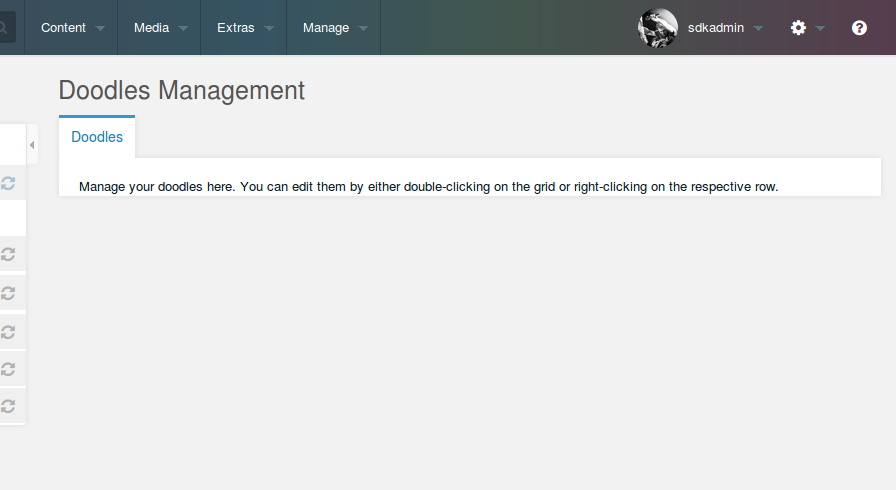
The panel is MODX-styled but empty. Panel в стиле MODX готова. Пока она пустая: нужна сетка.
The Doodles Grid
Uncomment the grid line in the controller:
$this->addJavascript($doodles->config['jsUrl'].'mgr/widgets/doodles.grid.js');
Create /www/doodles/assets/components/doodles/js/mgr/widgets/doodles.grid.js:
Doodles.grid.Doodles = function (config) {
    config = config || {};
    Ext.applyIf(config, {
        id: "doodles-grid-doodles",
        url: MODx.config.connector_url,
        baseParams: { action: "mgr/doodle/getList" },
        fields: ["id", "name", "description", "menu"],
        paging: true,
        remoteSort: true,
        anchor: "97%",
        autoExpandColumn: "name",
        columns: [
            {
                header: _("id"),
                dataIndex: "id",
                sortable: true,
                width: 60,
            },
            {
                header: _("doodles.name"),
                dataIndex: "name",
                sortable: true,
                width: 100,
                editor: { xtype: "textfield" },
            },
            {
                header: _("doodles.description"),
                dataIndex: "description",
                sortable: false,
                width: 350,
                editor: { xtype: "textfield" },
            },
        ],
    });
    Doodles.grid.Doodles.superclass.constructor.call(this, config);
};
Ext.extend(Doodles.grid.Doodles, MODx.grid.Grid);
Ext.reg("doodles-grid-doodles", Doodles.grid.Doodles);
| Option | Meaning |
|---|---|
id |
DOM ID of the grid. |
url |
The connector URL. MODX publishes it to the page as MODx.config.connector_url; use that instead of a path of your own. |
baseParams |
Parameters sent with every request. action names the processor that returns the rows. |
fields |
Fields the AJAX response fills the store with — the fields of a Doodle. |
paging |
Adds pagination; MODExt handles the toolbar. |
remoteSort |
Lets ExtJS sort the columns through the processor. |
anchor |
Stretches the grid to 97% of the panel, leaving room for padding. |
autoExpandColumn |
Lets the name column take the remaining width. |
columns |
The columns to show. dataIndex matches the field name, and an editor makes a column editable in place. |
Add the grid to the panel by removing the comment markers around the second item in home.panel.js:
[
    {
        html: "<p>" + _("doodles.management_desc") + "</p>",
        border: false,
        bodyCssClass: "panel-desc",
    },
    {
        xtype: "doodles-grid-doodles",
        cls: "main-wrapper",
        preventRender: true,
    },
]
preventRender keeps ExtJS from rendering the grid until the rest of the panel is loaded.
Сейчас grid отобразится, но останется пустым: у него нет connector, из которого получать данные.
Hooking Up via Connectors
A Connector is the file a request enters the model through. It checks access, then routes the request to a Processor — the form-layer file that runs the queries and modifies the data. Keeping the access points few and guarded is the point of the arrangement.
Create /www/doodles/assets/components/doodles/connector.php:
<?php
require_once dirname(dirname(dirname(dirname(__FILE__)))).'/config.core.php';
require_once MODX_CORE_PATH.'config/'.MODX_CONFIG_KEY.'.inc.php';
require_once MODX_CONNECTORS_PATH.'index.php';

$namespace = $modx->getObject(\MODX\Revolution\modNamespace::class, 'doodles');
$corePath = $namespace->getCorePath();
require_once $corePath.'src/Doodles.php';

$modx->services->add('doodles', function () use ($modx, $corePath) {
    return new \Doodles\Doodles($modx, ['basePath' => $corePath]);
});
$modx->lexicon->load('doodles:default');

/* handle request */
$path = $corePath.'processors/';
$modx->request->handleRequest(array(
    'processors_path' => $path,
));
In a standard MODX install the first line already resolves. In this development environment create /www/doodles/config.core.php:
<?php
define('MODX_CORE_PATH', '/www/modx/core/');
define('MODX_CONFIG_KEY', 'config');
Change the paths to your own installation, and add the file to .gitignore — it holds local paths and has no place in the repository.
The first three lines create the MODX instance and initialize it — connectors/index.php skips its own request handling precisely because we defined MODX_CORE_PATH before including it ($included = defined('MODX_CONNECTOR_INCLUDED') || defined('MODX_CORE_PATH'), connectors/index.php:17). The request is therefore ours to make, and the last lines do it: look up the Namespace, register the service the way bootstrap.php does, load the Doodles Lexicon topic, and let MODX route the request to the processors directory.
Opening the file directly returns an error instead of data:
{
    "success": false,
    "message": "Access denied.",
    "total": 0,
    "data": [],
    "object": []
}
Two things cause that. Connectors reject anyone without a manager session. And every request must carry an authorization key that prevents CSRF attacks, passed either as the modAuth header or as the HTTP_MODAUTH parameter. Its value is a token from the session of the user making the request — different for every user and every context, which is what makes it a session token rather than a site-wide secret. Never paste or share that value.
Это, кстати, не $modx->siteId: значение приходит из сессии пользователя и своё у каждого пользователя и каждого context.
None of this has to be handled by hand: MODExt sends the token both ways for requests made from the manager.
Вторая причина: у запроса нет маршрута. Базовый параметр action сетки равен mgr/doodle/getList, что указывает на:
/www/doodles/core/components/doodles/processors/mgr/doodle/getList.class.php
[!WARNING] The file name has to match the action, case included: MODX builds the path as
<processors_path><action>.class.phpwithout lowering the case (core/src/Revolution/modX.php:1833). Agetlist.class.phpnext to an action ofmgr/doodle/getListworks on macOS and Windows and fails on a Linux server.
Create it:
<?php
use MODX\Revolution\Processors\Model\GetListProcessor;

class DoodleGetListProcessor extends GetListProcessor {
    public $classKey = 'Doodles\\Model\\Doodle';
    public $languageTopics = ['doodles:default'];
    public $defaultSortField = 'name';
    public $defaultSortDirection = 'ASC';
    public $objectType = 'doodles.doodle';
}
return 'DoodleGetListProcessor';
GetListProcessor does the ordinary work of a list processor; the class properties say what to work on:
| Property | Meaning |
|---|---|
$classKey |
The xPDO class to read, here the Doodle objects. |
$languageTopics |
Lexicon topics to load for this processor. |
$defaultSortField |
Sort field used when the request does not name one. |
$defaultSortDirection |
Sort direction used when the request does not name one. |
$objectType |
Prefix for the standard error messages of this processor — doodles.doodle_err_nf and the rest of the topic. It also names the manager log entry. |
The trailing return names the class so that MODX can find it; the file itself may hold anything else the processor needs.
[!TIP] MODX looks for a processor in this order (
core/src/Revolution/modX.php:1786-1884): an autoloadable class ifactionis itself a class name, thenactionof the formcontext/updatemapped toMODX\Revolution\Processors\Context\Update, and only then a file. Core processors use the second form, which is why they need noreturnline at all.
Load the page:
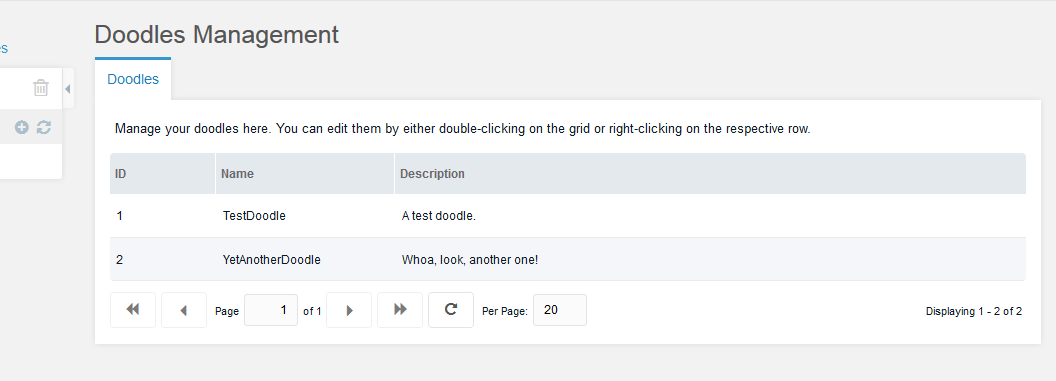
Сетка работает. Пока она только выводит список Doodles.
Adding Search
Add a text field to the top bar of the grid in _widgets/doodles.grid.js, right after the columns: definition:
,tbar:[{
    xtype: 'textfield'
    ,id: 'doodles-search-filter'
    ,emptyText: _('doodles.search...')
    ,listeners: {
        'change': {fn:this.search,scope:this}
        ,'render': {fn: function(cmp) {
            new Ext.KeyMap(cmp.getEl(), {
                key: Ext.EventObject.ENTER
                ,fn: function() {
                    this.fireEvent('change',this);
                    this.blur();
                    return true;
                }
                ,scope: cmp
            });
        },scope:this}
    }
}]
emptyText is shown while the field is empty. The change listener runs the search method, and the render listener fires the same event on ENTER.
Define that method by replacing the Ext.extend() line of the grid:
Ext.extend(Doodles.grid.Doodles, MODx.grid.Grid, {
    search: function (tf, nv, ov) {
        var s = this.getStore();
        s.baseParams.query = tf.getValue();
        this.getBottomToolbar().changePage(1);
        this.refresh();
    },
});
The store holds the grid data. Putting query into baseParams sends it to the processor with every request, and going back to page 1 keeps a match on the first page.
Handle the parameter in the getList processor by adding a method to the class:
    public function prepareQueryBeforeCount(xPDOQuery $c) {
        $query = $this->getProperty('query');
        if (!empty($query)) {
            $c->where([
                'name:LIKE' => '%' . $query . '%',
                'OR:description:LIKE' => '%' . $query . '%',
            ]);
        }
        return $c;
    }
prepareQueryBeforeCount() receives the xPDOQuery before getCount() runs and must return it. ->getProperty() reads a request parameter.
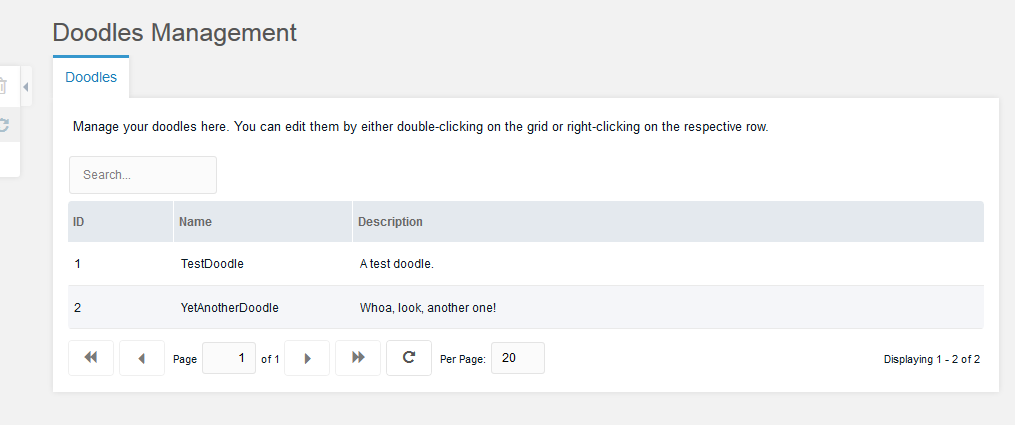
Сетка с поиском готова. Теперь сами записи.
[!TIP] MODX grids have a built-in filter mechanism — the lexicon grid configures it with
tbar.cls: 'has-nested-filters'and afiltersarray (manager/assets/modext/workspace/lexicon/lexicon.grid.js:16-24). The text field above is the older, hand-written way; it still works, and it lets you see exactly what goes over the wire.
Adding an Update Window
A MODX grid has no context menu until one is defined. Add a getMenu method to the grid, right below search:
    ,getMenu: function() {
        return [{
            text: _('doodles.doodle_update')
            ,handler: this.updateDoodle
        },'-',{
            text: _('doodles.doodle_remove')
            ,handler: this.removeDoodle
        }];
    }
MODx.grid.Grid adds whatever items getMenu returns to the context menu, so the two entries above bind it to updateDoodle and removeDoodle. The second method comes later.
Add updateDoodle below it:
    ,updateDoodle: function(btn,e) {
        e.preventDefault();
        if (!this.updateDoodleWindow) {
            this.updateDoodleWindow = MODx.load({
                xtype: 'doodles-window-doodle-update'
                ,record: this.menu.record
                ,listeners: {
                    'success': {fn:this.refresh,scope:this}
                }
            });
        }
        this.updateDoodleWindow.setValues(this.menu.record);
        this.updateDoodleWindow.show(e.target);
    }
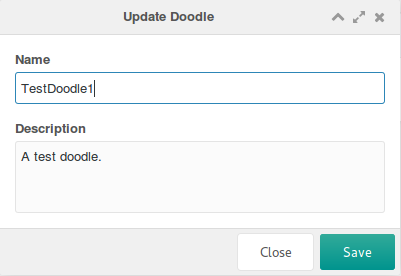
The window is created on the first right-click and reused afterwards, which is faster and avoids DOM ID conflicts. record passes the clicked row to the window: MODx.grid.Grid keeps it in this.menu.record, and MODx.Window fills its fields from it. The success listener refreshes the grid whenever the form submits successfully. On later calls setValues() overwrites the fields with the new row, and show(e.target) animates the window out of the clicked element.
Define the window at the end of the file:
Doodles.window.UpdateDoodle = function (config) {
    config = config || {};
    Ext.applyIf(config, {
        title: _("doodles.doodle_update"),
        url: MODx.config.connector_url,
        baseParams: {
            action: "mgr/doodle/update",
        },
        fields: [
            {
                xtype: "hidden",
                name: "id",
            },
            {
                xtype: "textfield",
                fieldLabel: _("doodles.name"),
                name: "name",
                anchor: "100%",
            },
            {
                xtype: "textarea",
                fieldLabel: _("doodles.description"),
                name: "description",
                anchor: "100%",
            },
        ],
    });
    Doodles.window.UpdateDoodle.superclass.constructor.call(this, config);
};
Ext.extend(Doodles.window.UpdateDoodle, MODx.Window);
Ext.reg("doodles-window-doodle-update", Doodles.window.UpdateDoodle);
The window has fields instead of columns, and the id is a hidden field because an update needs to know which record it changes.
MODx.Window wraps Ext.Window with a form that posts to url with baseParams and the field values, and adds Cancel and Save buttons labelled from cancelBtnText and saveBtnText when those are passed. Кнопки у окна — Cancel и Save, а не OK/Cancel.
The action above names the processor to create:
<?php
use MODX\Revolution\Processors\Model\UpdateProcessor;

class DoodleUpdateProcessor extends UpdateProcessor {
    public $classKey = 'Doodles\\Model\\Doodle';
    public $languageTopics = ['doodles:default'];
    public $objectType = 'doodles.doodle';
}
return 'DoodleUpdateProcessor';
UpdateProcessor saves the object and builds the response, so only the class properties are needed.
On MODX 3 this class also requires the save policy on an accessible object and answers Access denied. when it is missing — before any of your code runs.
Adding a Remove Context Menu Option
Add the JS method after updateDoodle in the grid:
    ,removeDoodle: function() {
        MODx.msg.confirm({
            title: _('doodles.doodle_remove')
            ,text: _('doodles.doodle_remove_confirm')
            ,url: MODx.config.connector_url
            ,params: {
                action: 'mgr/doodle/remove'
                ,id: this.menu.record.id
            }
            ,listeners: {
                'success': {fn:this.refresh,scope:this}
            }
        });
    }
MODx.msg.confirm shows a confirmation dialog and, once confirmed, calls a processor through the connector:
| Parameter | Meaning |
|---|---|
title |
Caption of the dialog. |
text |
The question asked; here whether the Doodle is really to be removed. |
url |
The connector URL. |
params |
REQUEST parameters: the processor path and the ID to remove. |
listeners |
Refreshes the grid on success, as in the update window. |
Create /www/doodles/core/components/doodles/processors/mgr/doodle/remove.class.php:
<?php
use MODX\Revolution\Processors\Model\RemoveProcessor;

class DoodleRemoveProcessor extends RemoveProcessor {
    public $classKey = 'Doodles\\Model\\Doodle';
    public $languageTopics = ['doodles:default'];
    public $objectType = 'doodles.doodle';
}
return 'DoodleRemoveProcessor';
RemoveProcessor does the deleting.
Creating the Create Form
R, U and D are in place. For C, add a button to the tbar of the grid config in doodles.grid.js, between the closing curly bracket of the search text field and the closing square bracket:
,{
   text: _('doodles.doodle_create')
   ,handler: { xtype: 'doodles-window-doodle-create' ,blankValues: true }
}
MODExt accepts a JavaScript object as a toolbar handler: it loads the window, blanks its values on open, and refreshes the grid on a successful submit.
Define the window at the end of the file:
Doodles.window.CreateDoodle = function (config) {
    config = config || {};
    Ext.applyIf(config, {
        title: _("doodles.doodle_create"),
        url: MODx.config.connector_url,
        baseParams: {
            action: "mgr/doodle/create",
        },
        fields: [
            {
                xtype: "textfield",
                fieldLabel: _("doodles.name"),
                name: "name",
                anchor: "100%",
            },
            {
                xtype: "textarea",
                fieldLabel: _("doodles.description"),
                name: "description",
                anchor: "100%",
            },
        ],
    });
    Doodles.window.CreateDoodle.superclass.constructor.call(this, config);
};
Ext.extend(Doodles.window.CreateDoodle, MODx.Window);
Ext.reg("doodles-window-doodle-create", Doodles.window.CreateDoodle);
The window is the update window without the id field and with create as the action.
Create /www/doodles/core/components/doodles/processors/mgr/doodle/create.class.php:
<?php
use MODX\Revolution\Processors\Model\CreateProcessor;

class DoodleCreateProcessor extends CreateProcessor {
    public $classKey = 'Doodles\\Model\\Doodle';
    public $languageTopics = ['doodles:default'];
    public $objectType = 'doodles.doodle';
    public function beforeSave() {
        $name = $this->getProperty('name');
        if (empty($name)) {
            $this->addFieldError('name', $this->modx->lexicon('doodles.doodle_err_ns_name'));
        } elseif ($this->doesAlreadyExist(['name' => $name])) {
            $this->addFieldError('name', $this->modx->lexicon('doodles.doodle_err_ae'));
        }
        return parent::beforeSave();
    }
}
return 'DoodleCreateProcessor';
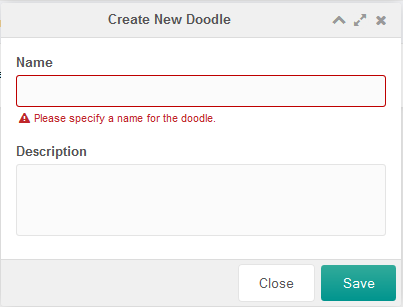
beforeSave() validates before CreateProcessor saves, and the check is twofold:
- an empty name gets the
doodles.doodle_err_ns_namemessage on thenamefield; - otherwise
doesAlreadyExist()looks for a Doodle of that name, and a match getsdoodles.doodle_err_aeon the same field.
Field errors arrive in the data element of the connector response, which is what marks the field red in the window:
Adding Inline-Editing
MODExt grids edit in place as well. Add this to the Doodles.grid.Doodles config, right below autoExpandColumn:
    ,save_action: 'mgr/doodle/updateFromGrid'
    ,autosave: true
Inline editing is on, and every save goes to the mgr/doodle/updateFromGrid processor. Create /www/doodles/core/components/doodles/processors/mgr/doodle/updateFromGrid.class.php:
<?php
require_once dirname(__FILE__) . '/update.class.php';

class DoodleUpdateFromGridProcessor extends DoodleUpdateProcessor {
    public function initialize() {
        $data = $this->getProperty('data');
        if (empty($data)) return $this->modx->lexicon('invalid_data');
        $data = $this->modx->fromJSON($data);
        if (empty($data)) return $this->modx->lexicon('invalid_data');
        $this->setProperties($data);
        $this->unsetProperty('data');
        return parent::initialize();
    }
}
return 'DoodleUpdateFromGridProcessor';
The grid sends the changed record as one JSON string in data, not as separate parameters, so initialize() decodes it and hands the fields to the update processor it extends.
Summary
CRUD-интерфейс готов: создание, обновление, удаление, поиск, пагинация и сортировка Doodles.
Part 3 builds a Transport Package so the Extra can be installed on any MODX site.
Note
$objectType is not required in the processors above. MODX falls back to the plain value object, which is what a Plugin receives in $scriptProperties['object'] — with ten components and ten $objectType values, that means ten different names for the same thing.
On MODX 3 the object key is passed either way: the processors send $this->objectType => &$this->object and a hardcoded 'object' => &$this->object (core/src/Revolution/Processors/Model/CreateProcessor.php:162-163, 191-192). Leaving $objectType out removes the second name, and the manager log entries become object_create and object_update.
Support the team building MODX with a monthly donation.
The budget raised through OpenCollective is transparent, including payouts, and any contributor can apply to be paid for their work on MODX.
Backers
Budget
$194 per month—let's make that $500!
Learn more