

Resources


Last updated Oct 20th, 2026 | Page history | Improve this page | Report an issue
Support the team building MODX with a monthly donation.
The budget raised through OpenCollective is transparent, including payouts, and any contributor can apply to be paid for their work on MODX.
Backers


Budget
$194 per month—let's make that $500!
Learn moreWhat is a Resource?
A Resource is a page or another item in the Resource tree: a Document, a Weblink, a Symlink, or a Static Resource. Custom Resource Classes add more types.
Every Resource has an ID. Use the ID in link tags so MODX generates the URL; aliases and Content Types can then change without breaking links.
Managing Resources
Resources appear in the Resources tree on the left. Click a Resource to edit it, or right-click it and choose Edit. The edit page opens:
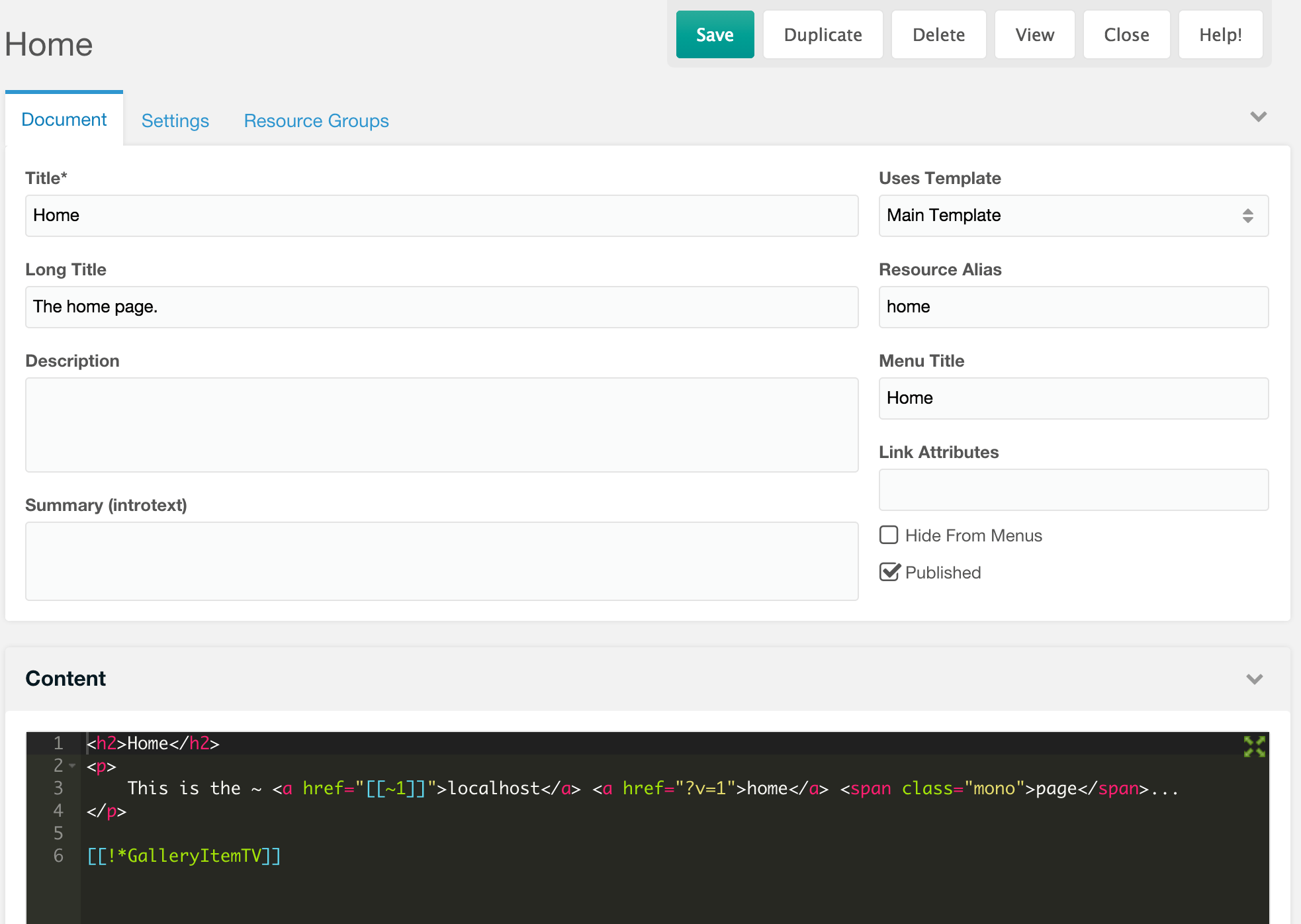
Resource Groups tab and Access
The Resource Groups tab lists every Resource Group. Access is membership, not an ACL grant.
- Check Access and save: the Resource joins the group.
- Uncheck Access and save: the Resource leaves the group.
The Resource stays public until the group is paired with a User Group and an ACL. See Resource Groups.
A new Resource under a parent that belongs to groups starts with those Access boxes checked. The resourcegroup_resource_edit permission is required to see and change them.
Resource Fields
The tables list the fields on the Resource edit page. id is inherited; the other fields are columns in modx_site_content.
Content fields
| Name | Description |
|---|---|
| id | The ID of the Resource. |
| pagetitle | The title of the Resource. |
| longtitle | A longer title of the Resource. |
| description | An extended description of the Resource. |
| introtext | An introductory excerpt, also called Summary. Useful for blogs and search results. |
| alias | The URL alias, used with Friendly URLs. A Resource with alias home and an HTML Content Type renders as home.html unless it is a container. |
| alias_visible | Whether the alias appears in the URIs of child Resources when alias paths are enabled. |
| parent | The ID of the parent Resource. |
| type | Legacy type label, document or reference. MODX routes by class_key, not by this field. |
| class_key | The fully qualified class of the Resource. A Document uses MODX\Revolution\modDocument. See Custom Resource Classes. |
| context_key | The key of the Context the Resource belongs to, usually web. |
| template | The Template used by the Resource. |
| content_type | The Content Type ID. It sets the MIME type and the file extension. |
| content | The Resource content. Its meaning depends on the Resource type; see the table below. |
| richtext | Whether the Resource uses a rich text editor, when one is installed. |
Content by Resource type
| Type | What content holds |
|---|---|
| Document | HTML and MODX tags. |
| Weblink | A URL, or the ID of a Resource to redirect to. |
| Symlink | The ID of the target Resource. |
| Static Resource | The path to a file, relative to resource_static_path or absolute when allowed. |
Publishing and menu fields
| Name | Description |
|---|---|
| published | Whether the Resource is published and viewable on the front-end. |
| pub_date | The scheduled date and time to publish the Resource. |
| unpub_date | The scheduled date and time to unpublish the Resource. |
| isfolder | Labeled Container. Makes Friendly URLs end with / instead of the Content Type suffix. |
| hidemenu | Also called Hide from Menus. Most menu and navigation snippets skip the Resource. |
| menutitle | The title shown in menus. |
| menuindex | The order index in a menu. Higher values come later. |
| link_attributes | Attributes added to links by menu snippets. Can be repurposed. |
| searchable | Whether the Resource is searchable. |
| cacheable | Whether the Resource output is cacheable. |
System fields
| Name | Description |
|---|---|
| createdby | The ID of the user who created the Resource. |
| createdon | The date the Resource was created. |
| editedby | The ID of the last user to edit the Resource. |
| editedon | The date the Resource was last edited. |
| publishedby | The ID of the user who last published the Resource. |
| publishedon | The date the Resource was published. |
| deleted | Whether the Resource is deleted. |
| deletedby | The ID of the user who deleted the Resource. |
| deletedon | The date the Resource was deleted. |
| content_dispo | 0 sends a binary file inline; 1 sends it as an attachment. |
| uri | The generated URI. Freeze it with uri_override. |
| uri_override | Keep the current URI and stop MODX from regenerating it. |
| show_in_tree | Show the Resource in the manager tree. |
| hide_children_in_tree | Hide this Resource’s children in the manager tree. |
| properties | A JSON object of namespaced properties. Weblinks store their responseCode here. |
Using Resource Fields
Resource fields are available in templates and content through the Template Variable syntax.
[[*pagetitle]]
[[*id]]
[[*createdby]]
Output Filters can modify the value:
[[*introtext:ellipsis=`100`]]
[[*editedby:userinfo=`username`]]
[[*publishedby:userinfo=`email`]]
ellipsis limits introtext to 100 characters and adds an ellipsis. userinfo returns the username or email of the user stored in the field.
Accessing Resource Fields in a Snippet
A Snippet receives the current Resource as $modx->resource. This returns pagetitle reversed:
$output = $modx->resource->get('pagetitle');
return strrev($output);
Linking to a Resource
Link tags generate URLs for Resources:
[[~123]]
123 is the Resource ID. MODX renders the URL at request time.
Also see Named Anchor.
URL Parameters for Link Tags
Add parameters to a Link Tag with backticks:
[[~42? &tag=`Snacks` &sort=`Taste`]]
If Resource 42 resolves to store/items.html, the tag renders:
store/items.html?tag=Snacks&sort=Taste
URL Schemes in Link Tags
Set the scheme with the scheme property:
[[~123? &scheme=`https`]]
The available schemes are:
| Name | Description |
|---|---|
| -1 | (default) URL is relative to site_url |
| 0 | Forces http when the current request uses https |
| 1 | Forces https when the current request uses http |
| full | Absolute URL, prepended with site_url |
| abs | Absolute URL, prepended with base_url |
| http | Absolute URL with the http scheme |
| https | Absolute URL with the https scheme |
See Also
Support the team building MODX with a monthly donation.
The budget raised through OpenCollective is transparent, including payouts, and any contributor can apply to be paid for their work on MODX.
Backers
Budget
$194 per month—let's make that $500!
Learn more