

Developing an Extra, Part III


Last updated Oct 20th, 2026 | Page history | Improve this page | Report an issue
Support the team building MODX with a monthly donation.
The budget raised through OpenCollective is transparent, including payouts, and any contributor can apply to be paid for their work on MODX.
Backers


Budget
$194 per month—let's make that $500!
Learn moreThis tutorial is part of a Series:
- Part I: Getting Started and Creating the Doodles Snippet
- Part II: Creating our Custom Manager Page
- Part III: Packaging Our Extra
Overview
This part packages the Extra from part 1 and part 2 into a Transport Package, so that it can be installed on any MODX site.
Read Transport Packages and Creating a Build Script first if either is unfamiliar. For an Extra without a CMP, PackMan packages one without a script; this Extra has a CMP, so the script is written by hand.
By the end the package will contain:
- the Snippet and its default properties;
- the files from
core/componentsandassets/components; - the Menu and Namespace of the CMP;
- a Resolver that creates the custom table in the installing user’s database.
Setting Up Our Build Directory
The _build directory will look like this when the work is done. Part 1 created build.config.php and build.schema.php; the rest is new.
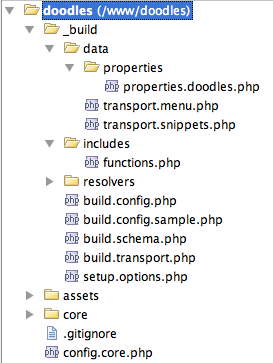
- data — the scripts that package the MODX objects.
- resolvers — the resolvers run at install time.
- build.transport.php — the main build script, which creates the Transport Package.
- setup.options.php — the form shown during installation; touched only briefly here.
The Build Script
Create /www/doodles/_build/build.transport.php:
<?php
set_time_limit(0);

/* define package names */
define('PKG_NAME','Doodles');
define('PKG_NAME_LOWER','doodles');
define('PKG_VERSION','1.0');
define('PKG_RELEASE','beta4');

/* define build paths */
$root = dirname(dirname(__FILE__)).'/';
$sources = array(
    'root' => $root,
    'build' => $root . '_build/',
    'data' => $root . '_build/data/',
    'resolvers' => $root . '_build/resolvers/',
    'lexicon' => $root . 'core/components/'.PKG_NAME_LOWER.'/lexicon/',
    'docs' => $root.'core/components/'.PKG_NAME_LOWER.'/docs/',
    'elements' => $root.'core/components/'.PKG_NAME_LOWER.'/elements/',
    'source_assets' => $root.'assets/components/'.PKG_NAME_LOWER,
    'source_core' => $root.'core/components/'.PKG_NAME_LOWER,
);
unset($root);

/* override with your own defines here (see build.config.sample.php) */
require_once $sources['build'] . 'build.config.php';
require_once MODX_CORE_PATH . 'vendor/autoload.php';

$modx = new \MODX\Revolution\modX();
$modx->initialize('mgr');
$modx->setLogLevel(modX::LOG_LEVEL_INFO);
$modx->setLogTarget('ECHO');

$builder = new \MODX\Revolution\Transport\modPackageBuilder($modx);
$builder->createPackage(PKG_NAME_LOWER, PKG_VERSION, PKG_RELEASE);
$builder->registerNamespace(PKG_NAME_LOWER, false, true, '{core_path}components/' . PKG_NAME_LOWER . '/');

/* zip up package */
$modx->log(modX::LOG_LEVEL_INFO,'Packing up transport package zip...');
$builder->pack();
exit();
This much packages the Namespace and produces a doodles-1.0-beta4.transport.zip. The $sources array is the reference for every file the rest of the script adds. Note that source_core and source_assets carry no trailing slash, which matters when they are used as resolver sources.
modPackageBuilder is autoloaded from core/src/ by Composer, so nothing is loaded by hand. The old $modx->loadClass('transport.modPackageBuilder', …) wrote a deprecation entry on every build and is gone.
Two methods matter:
$builder->createPackage(PKG_NAME_LOWER, PKG_VERSION, PKG_RELEASE);
$builder->registerNamespace(PKG_NAME_LOWER, false, true, '{core_path}components/' . PKG_NAME_LOWER . '/');
createPackage(key, version, release) names the package. The key is lowercased for you; the version and release come from the defines above.
registerNamespace() parameter |
Value | Meaning |
|---|---|---|
namespace_name |
doodles |
Name of the Namespace. |
autoincludes |
false |
Whether to package an array of Namespace-associated classes. Not wanted. |
packageNamespace |
true |
Whether to add the Namespace to the package. Wanted. |
namespacePath |
{core_path}components/doodles/ |
Path the Namespace ends up at. |
assetsPath |
not passed | Assets Path of the Namespace. |
{core_path} is a placeholder that MODX substitutes at install time, so the package does not hard-code an installation layout and stays portable. If the Namespace does not exist on the target site, MODX creates it with that path.
pack() builds the zip from everything added so far, and exit() makes sure nothing else runs after it. Run the script from the command line:
php /www/doodles/_build/build.transport.php
The zip appears in the core/packages/ directory of the installation:
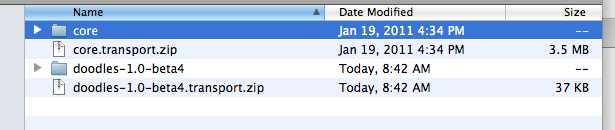
Installing it does nothing yet, because no objects and no files are in it.
Adding in the Data
The Snippet goes into a category of its own so that it stays separated from other Snippets on the user’s site. Add this below the registerNamespace call in build.transport.php:
$category = $modx->newObject(MODX\Revolution\modCategory::class);
$category->set('id',1);
$category->set('category',PKG_NAME);

/* add snippets */
 //$modx->log(modX::LOG_LEVEL_INFO,'Packaging in snippets...');
 //$snippets = include $sources['data'].'transport.snippets.php';
 //if (empty($snippets)) $modx->log(modX::LOG_LEVEL_ERROR,'Could not package in snippets.');
 //$category->addMany($snippets);

/* create category vehicle */
$attr = array(
    xPDOTransport::UNIQUE_KEY => 'category',
    xPDOTransport::PRESERVE_KEYS => false,
    xPDOTransport::UPDATE_OBJECT => true,
    xPDOTransport::RELATED_OBJECTS => true,
    xPDOTransport::RELATED_OBJECT_ATTRIBUTES => array (
        'Snippets' => array(
            xPDOTransport::PRESERVE_KEYS => false,
            xPDOTransport::UPDATE_OBJECT => true,
            xPDOTransport::UNIQUE_KEY => 'name',
        ),
    ),
);
$vehicle = $builder->createVehicle($category,$attr);
$builder->putVehicle($vehicle);
The category object is never saved — only carried into the package, inside a Vehicle. A Vehicle is the wrapper that tells MODX how to install an object and what to do with it on removal.
Creating a 3rd Party Component Build Script covers the same attributes in depth; here they are:
| Attribute | Meaning |
|---|---|
UNIQUE_KEY => 'category' |
The field that identifies this Category. The ID on the target site is almost never the ID here, and the unique key is how MODX finds the installed category again to update or remove it. |
PRESERVE_KEYS => false |
Whether to keep the primary key of the object on install. It only does anything on SQL Server, where preserving an explicit ID needs IDENTITY_INSERT; on MySQL a row that already exists keeps its key whatever this says. The Category does not need its ID, so this is false. |
UPDATE_OBJECT => true |
Update the Category if it is already installed. Without it an upgrade would skip the object, and the Category is exactly the object that changes between releases. |
RELATED_OBJECTS => true |
Package related objects — the Snippet — along with the Category, so the Snippet is assigned to the Category being installed. |
RELATED_OBJECT_ATTRIBUTES |
Per-alias settings for those related objects. The single key Snippets applies the next set to the Snippets. |
RELATED_OBJECT_ATTRIBUTES applies this to each Snippet:
'Snippets' => array(
   xPDOTransport::PRESERVE_KEYS => false,
   xPDOTransport::UPDATE_OBJECT => true,
   xPDOTransport::UNIQUE_KEY => 'name',
),
The Snippet is not installed under a fixed ID, an existing one is updated, and it is matched on the name Doodles — which is also how an uninstall finds and removes it.
createVehicle() wraps the Category with those attributes, and putVehicle() adds it to the package. The Snippet still has to be attached.
Adding the Snippet
Create /www/doodles/_build/data/ and put transport.snippets.php in it:
<?php
function getSnippetContent($filename) {
    $o = file_get_contents($filename);
    $o = trim(str_replace(array('<?php','?>'),'',$o));
    return $o;
}
$snippets = array();

$snippets[1]= $modx->newObject(MODX\Revolution\modSnippet::class);
$snippets[1]->fromArray(array(
    'id' => 1,
    'name' => 'Doodles',
    'description' => 'Displays a list of Doodles.',
    'snippet' => getSnippetContent($sources['elements'].'snippets/snippet.doodles.php'),
),'',true,true);
$properties = include $sources['data'].'properties/properties.doodles.php';
$snippets[1]->setProperties($properties);
unset($properties);

return $snippets;
The helper reads the Snippet file built in part 1 and strips the <?php tags from it. The $snippets array collects everything to be packaged, one entry per Snippet, and each Snippet is created but never saved. The array is returned for the build script to attach.
Uncomment the block that was skipped in build.transport.php:
/* add snippets */
$modx->log(modX::LOG_LEVEL_INFO,'Packaging in snippets...');
$snippets = include $sources['data'].'transport.snippets.php';
if (empty($snippets)) $modx->log(modX::LOG_LEVEL_ERROR,'Could not package in snippets.');
$category->addMany($snippets);
The Snippet is now in the Category Vehicle. The properties it was given are next.
Adding in Snippet Properties
Create /www/doodles/_build/data/properties/properties.doodles.php:
<?php
$properties = array(
    array(
        'name' => 'tpl',
        'desc' => 'prop_doodles.tpl_desc',
        'type' => 'textfield',
        'options' => '',
        'value' => 'rowTpl',
        'lexicon' => 'doodles:properties',
    ),
    array(
        'name' => 'sort',
        'desc' => 'prop_doodles.sort_desc',
        'type' => 'textfield',
        'options' => '',
        'value' => 'name',
        'lexicon' => 'doodles:properties',
    ),
    array(
        'name' => 'dir',
        'desc' => 'prop_doodles.dir_desc',
        'type' => 'list',
        'options' => array(
            array('text' => 'prop_doodles.ascending','value' => 'ASC'),
            array('text' => 'prop_doodles.descending','value' => 'DESC'),
        ),
        'value' => 'DESC',
        'lexicon' => 'doodles:properties',
    ),
);
return $properties;
One array per default property of the Snippet:
| Key | Meaning |
|---|---|
name |
Property key. It reaches the caller as [[Doodles? &tpl=rowTpl]], and value is the default. |
desc |
Description text, or a Lexicon key when lexicon is set — here it is one, so the properties are translatable. |
type |
The field type: textfield, textarea, combo-boolean, datefield, list, numberfield, file or color. |
options |
Only used by list and color: an array of text / value pairs. text may itself be a Lexicon key. |
value |
Default value. |
lexicon |
Lexicon topic holding the description strings. |
area |
Optional. Groups the property in a separate area of the properties tab; empty by default. |
The doodles:properties topic referenced above does not exist yet. Create /www/doodles/core/components/doodles/lexicon/en/properties.inc.php:
<?php
$_lang['prop_doodles.ascending'] = 'Ascending';
$_lang['prop_doodles.descending'] = 'Descending';
$_lang['prop_doodles.dir_desc'] = 'The direction to sort by.';
$_lang['prop_doodles.sort_desc'] = 'The field to sort by.';
$_lang['prop_doodles.tpl_desc'] = 'The chunk for displaying each row.';
The keys match the desc values in the properties file, which is what translates the properties tab.
Run the build script now and the Category, the Snippet and its properties are in the package. The files themselves are not — that is what resolvers are for.
Adding the File Resolvers
Add /www/doodles/core/components/doodles/ and /www/doodles/assets/components/doodles/ to the Category Vehicle with File Resolvers. A resolver is a script that runs after the package is installed and copies files into the user’s installation.
Insert this in build.transport.php between $vehicle = $builder->createVehicle($category,$attr); and $builder->putVehicle($vehicle);:
$modx->log(modX::LOG_LEVEL_INFO,'Adding file resolvers to category...');
$vehicle->resolve('file',array(
    'source' => $sources['source_assets'],
    'target' => "return MODX_ASSETS_PATH . 'components/';",
));
$vehicle->resolve('file',array(
    'source' => $sources['source_core'],
    'target' => "return MODX_CORE_PATH . 'components/';",
));
[!WARNING] Order matters here.
putVehicle()copies the vehicle into the package, and a resolver added after that call is never copied — the build “succeeds” and the files simply do not arrive on install.
The first argument of resolve() is the resolver type; 'file' is the built-in file resolver. It takes two options:
| Option | Meaning |
|---|---|
source |
Where the files are now: $sources['source_assets'] and $sources['source_core'], without a trailing slash. |
target |
An evaluated statement returning where to install them — the assets path and the core path of the user’s installation. |
The package now carries the core/ and assets/ directories and installs them into the right places.
Adding the Menu
The CMP needs its Menu item packaged too. Add this below the putVehicle line of the Category:
$modx->log(modX::LOG_LEVEL_INFO,'Packaging in menu...');
$menu = include $sources['data'].'transport.menu.php';
if (empty($menu)) $modx->log(modX::LOG_LEVEL_ERROR,'Could not package in menu.');
$vehicle= $builder->createVehicle($menu,array (
    xPDOTransport::PRESERVE_KEYS => true,
    xPDOTransport::UPDATE_OBJECT => true,
    xPDOTransport::UNIQUE_KEY => 'text',
));
$builder->putVehicle($vehicle);
unset($vehicle,$menu);
UNIQUE_KEY is text here: the menu key is what lets an upgrade find and update the item already installed.
Create /www/doodles/_build/data/transport.menu.php:
<?php
$menu= $modx->newObject(MODX\Revolution\modMenu::class);
$menu->fromArray(array(
    'text' => 'doodles',
    'parent' => 'components',
    'description' => 'doodles.desc',
    'icon' => '<i class="icon-cube icon"></i>',
    'menuindex' => 0,
    'params' => '',
    'handler' => '',
    'action' => 'index',
    'namespace' => 'doodles',
),'',true,true);

return $menu;
The array keys are the columns of the menu table. action and namespace are what tell MODX which controller to load on click — there is no separate Action object in MODX 3. The icon is written into the menu as raw HTML, so it takes a tag such as <i class="icon-cube icon"></i>; a file name ends up printed as broken text.
The table also has a permissions column, left empty here. It takes a comma-separated list of permission names, and MODX checks it in two places: the Manager skips the menu entry for users who lack the permission, and a direct hit on the route raises an access error. An empty list is not “restricted” — the item simply stays visible to everyone who can reach the Manager, which is the right default for an Extra that ships its own settings.
[!WARNING] A name in that column has to exist before it can be granted. Creating it is a separate step in the Manager: Access → Permissions, where the permission is added to a policy template, and that policy is then granted to a User Group. Fill the column in on a site where no such permission exists yet and the menu entry disappears for everyone — including the administrator who just installed the package.
Adding a Resolver
An installed Extra still has no modx_doodles table, because a resolver has not created it yet. A PHP Resolver runs after the Vehicle it is attached to has been installed; attach this one to the Menu Vehicle, right below its createVehicle call and before putVehicle:
$modx->log(modX::LOG_LEVEL_INFO,'Adding in PHP resolvers...');
$vehicle->resolve('php',array(
    'source' => $sources['resolvers'] . 'resolve.tables.php',
));
Only a source is passed, pointing at the script. Create /www/doodles/_build/resolvers/resolve.tables.php:
<?php
if ($object->xpdo) {
    switch ($options[xPDOTransport::PACKAGE_ACTION]) {
        case xPDOTransport::ACTION_INSTALL:
            $modx =& $object->xpdo;
            $namespace = $modx->getObject(MODX\Revolution\modNamespace::class, 'doodles');
            $modelPath = $namespace->getCorePath() . 'src/';

            $modx->addPackage('Doodles\Model', $modelPath, null, 'Doodles\\');

            $manager = $modx->getManager();
            $manager->createObjectContainer('Doodles\\Model\\Doodle');

            break;
        case xPDOTransport::ACTION_UPGRADE:
            break;
    }
}
return true;
$object is the Menu, because the resolver hangs off the Menu Vehicle, and $object->xpdo is MODX itself. The switch reads xPDOTransport::PACKAGE_ACTION from $options and runs the body only on a new install, ACTION_INSTALL.
The path comes from the installed Namespace record, not from a System Setting of our own that nobody would have created. addPackage() loads the model generated in part 1, and createObjectContainer() runs the SQL that creates the table. Returning true tells MODX the resolver succeeded.
Build and install, and the table appears.
Adding the Changelog, Readme, License and Setup Options
Packages can show a license, a readme and a changelog in the installer dialog. Three files in docs/ supply the text.
Create /www/doodles/core/components/doodles/docs/changelog.txt:
Changelog file for Doodles component.

Doodles 1.0
====================================
- Updating text, ready to build
- Added default properties to Doodles snippet in build
- Fixes to doodles class
- Fixed bugs with build, updated readme
- Initial commit
Create /www/doodles/core/components/doodles/docs/license.txt with your license text.
Create /www/doodles/core/components/doodles/docs/readme.txt:
--------------------
Extra: Doodles
--------------------
Version: 1.0

A simple demo extra for creating robust 3rd-Party Components in MODX Revolution.
Add this at the end of build.transport.php, right before $builder->pack():
$modx->log(modX::LOG_LEVEL_INFO,'Adding package attributes and setup options...');
$builder->setPackageAttributes(array(
    'license' => file_get_contents($sources['docs'] . 'license.txt'),
    'readme' => file_get_contents($sources['docs'] . 'readme.txt'),
    'changelog' => file_get_contents($sources['docs'] . 'changelog.txt'),
    'setup-options' => array(
        'source' => $sources['build'].'setup.options.php',
    ),
));
license, readme and changelog take the text of the corresponding file. setup-options takes a source path to a PHP file, the way a resolver does. Create /www/doodles/_build/setup.options.php:
<?php
$output = '';
switch ($options[xPDOTransport::PACKAGE_ACTION]) {
    case xPDOTransport::ACTION_INSTALL:
        $output = '<h2>Doodles Installer</h2>
<p>Thanks for installing Doodles! Please review the setup options below before proceeding.</p><br />';
        break;
    case xPDOTransport::ACTION_UPGRADE:
        break;
}
return $output;
The setup options file works like a resolver and returns the HTML of the installation form. So far it only greets the user.
[!TIP] The uninstall action never reaches this file:
Processors/Workspace/Packages/GetAttribute.php:89-97passes onlyACTION_INSTALLandACTION_UPGRADE, and setup options are not shown at all on uninstall.
Any form element in that HTML arrives in the $options array of the resolvers under its name, so a resolver can read what the user filled in — a field named test is $options['test']. That is how an Extra can ask questions before it installs. Going further than the greeting shown here is beyond the scope of this tutorial; Quip is a published Extra that does it, and its source code shows how.
Summary
Run build.transport.php and a doodles-1.0-beta4.transport.zip appears in the core/packages/ directory. Upload it to another installation to install the Extra there — a different one from the copy you developed in — or share the file.
Across the three parts of this tutorial:
- set up a directory structure for the Extra outside the MODX repository, under Git;
- added a custom xPDO model and a templatable Snippet that lists the records;
- built a Custom Manager Page with a CRUD grid, search and inline editing;
- wrote a build script that packages the files and the MODX objects;
- made the package create the custom table on install;
- made the package show the license, readme, changelog and a status message.
The finished Extra is on GitHub: https://github.com/splittingred/doodles
Support the team building MODX with a monthly donation.
The budget raised through OpenCollective is transparent, including payouts, and any contributor can apply to be paid for their work on MODX.
Backers
Budget
$194 per month—let's make that $500!
Learn more