

MODx.combo.ComboBox


Last updated Oct 11th, 2026 | Page history | Improve this page | Report an issue
Support the team building MODX with a monthly donation.
The budget raised through OpenCollective is transparent, including payouts, and any contributor can apply to be paid for their work on MODX.
Backers


Budget
$185 per month—let's make that $500!
Learn moreMODx.combo.ComboBox
Extends:Ext.form.ComboBox Key Features: Remote and local data stores; grid renderer.
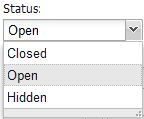
The MODExt ComboBox has all the functionality of a regular Ext ComboBox. It can be populated remotely by an array of JSON objects from a connector (default), or locally (a plain JavaScript array or an Ext ArrayStore, with the “mode” config option set to “local”).
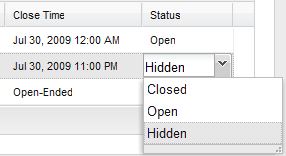
A unique feature is the built-in renderer for grids: use a ComboBox as a grid editor and it displays the correct displayValue in the grid cell:
Unique Parameters
The unique parameters are pass-through parameters to the combo’s data store:
| Name | Description | Default |
|---|---|---|
| url | The URL to the connector. | |
| baseParams | Any other parameters to always send to the connector. | { action: ‘GetList’ } |
| fields | The fields, in array format, you expect from the connector response. | [‘id’, ‘name’] |
The class also inherits all Ext.form.ComboBox properties.
Notes:
- The constructor accepts a second argument,
getStore(default true). Pass false to skip automatic store creation (e.g. when supplying your own store). - The combo fires a
loadedevent after its store has finished loading.
Using the Grid Renderer
In a grid’s column model definition, specify renderer: true in the editor definition:
{
  header: _('usergroup')
  ,dataIndex: 'usergroup'
  ,width: 140
  ,editor: { xtype: 'modx-combo-usergroup' ,renderer: true}
}
Units Combo Box
Doodles.combo.Units = function(config) {
    config = config || {};
    Ext.applyIf(config,{
        store: new Ext.data.ArrayStore({
            id: 0
            ,fields: ['unit','display']
            ,data: [
                ['MB','Megabyte']
                ,['GB','Gigabyte']
                ,['TB','Terabyte']
                ,['PB','Petabyte']
                ,['EB','Exabyte']
                ,['ZB','Zettabyte']
                ,['YB','Yottabyte']
            ]
        })
        ,mode: 'local'
        ,displayField: 'display'
        ,valueField: 'unit'
    });
    Doodles.combo.Units.superclass.constructor.call(this,config);
};
Ext.extend(Doodles.combo.Units,MODx.combo.ComboBox);
Ext.reg('doodle-combo-units',Doodles.combo.Units);
store supplies the fields and data; set mode to 'local' for this approach.
Combo Call From Grid
{
    header: _('unit')
    ,dataIndex: 'unit'
    ,sortable: false
    ,width: 50
    ,editor: { xtype: 'doodle-combo-units', renderer: true }
}
Combo Call From Window
{
    xtype: 'doodle-combo-units'
    ,fieldLabel: _('unit')
    ,name: 'unit'
    ,hiddenName: 'unit'
    ,anchor: '100%'
}
hiddenName must be set when calling from a create or update window to save the value; it is not needed in the grid view.
Support the team building MODX with a monthly donation.
The budget raised through OpenCollective is transparent, including payouts, and any contributor can apply to be paid for their work on MODX.
Backers
Budget
$185 per month—let's make that $500!
Learn more